Tuesday, November 26, 2019

Behavior Recognition System Based on Convolutional Neural Network

Our this article is on this research paper . 
Credit : Bo YU

What we will do ?

We build a set of human behavior recognition system based on the convolution neural network constructed for the specific human behavior in public places. 

(i) : Firstly, video of human behavior data set will be segmented into images, then we process the images by the method of background subtraction to extract moving foreground characters of body. (ii). Secondly, the training data sets are trained into the designed convolution neural network, and the depth learning network is constructed by stochastic gradient descent.
(iii). Finally, the various behaviors of samples are classified and identified with the obtained network model, and the recognition results are compared with the current mainstream methods. The result show that the convolution neural network can study human behavior model automatically and identify human’s behaviors without any manually annotated trainings. 

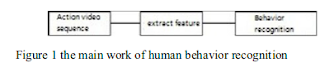
Human behavior recognition is mainly divided into two processes: the identification and understanding of human behavior feature extraction and motion .

This algorithm is mainly composed of three parts, 
1.  Video pretreatment, 2. Model training 3. Behavior recognition part. 


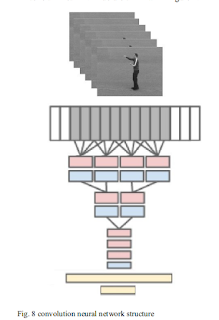
In the video preprocessing part, firstly the original behavior of video preprocessing, using block updating background subtraction method to achieve target detection, two value image motion information is extracted, then the image input channel convolutional neural network, through the iterative training parameters of the network, to construct a model for convolution Behavior Recognition . Finally, you can use this network to identify human behavior .


Implementation Code on Github : Code


Thursday, November 14, 2019

Frame Extraction From Multiple Videos @x fps (Frame Per Second) In Python

Our this article is extension of previous article .In this article we will extract frame from multiple videos having same length duration .

We are assuming the following conditions :

1. All Videos should have same length duration .

In Our Below code you only need to give path location of videos .

#!/usr/bin/env python3
# -*- coding: utf-8 -*-
"""
Created on Thu Nov 14 09:47:58 2019

@author: Jo
"""
#Doing with open cv2
#Import Cv2 library
import numpy as np
import cv2,os
from moviepy.editor import VideoFileClip

#location of the input files
inputfilepaths=["Dataset/big1.mp4","Dataset/big2.mp4","Dataset/big3.mp4","Dataset/big4.mp4"
                ,"Dataset/big5.mp4","Dataset/big6.mp4","Dataset/big7.mp4"]

#For saving output 
if not os.path.exists('Frames'):
    os.makedirs('Frames')

video=[]
#location of video file
for x in range(0,len(inputfilepaths)):
    video.append(cv2.VideoCapture(inputfilepaths[x]))
    print(x+1,"Video length ",VideoFileClip(inputfilepaths[0]).duration,"seconds")

def extractframe(sec):
    # cap.set(cv2.CAP_PROP_POS_MSEC,sec*1000) is responsible for
    #skipping directly to the sec in the video (sec*1000th millisecond)
  
        #reading frame
    hasframes=np.array([])

    for x in range(0,len(video)):
        video[x].set(cv2.CAP_PROP_POS_MSEC,sec*1000)
        hasimage,images=video[x].read()
        hasframes=np.append(hasframes,hasimage)
     
    if hasframes[len(hasframes)-1]:
        #Write to location , increasing the count to avoid name conflict of immges
        for x in range(0,len(video)):
             hasimage,images=video[x].read()
             cv2.imwrite("Frames/{0}video{1}.jpg".format(x+1,count), images)

    return hasframes[len(hasframes)-1]

#starting from 0th second
sec = 0
#Setting fps , here it will capture image in each 0.5 second , 2fps
frameRate = 0.5
count=1

#to check whether frame are their in video or not.
success = extractframe(sec)
while success:
    #increasing counter to name conflick
    count = count + 1
    #setting sec
    sec = sec + frameRate
    sec = round(sec, 2)
    print(sec)
    success = extractframe(sec)
 

*----------------------------------------------------------      
Github Link : 

Frame Extraction From Video @x fps (Frame Per Second) In Python

Video is collection of Frames . In this article we will know how to extract frames from video @x fps(Frame per second) using Python . 

A frame is one of the many still images which compose the complete moving picture . When the moving picture is displayed, each frame is flashed on a screen for a short time (nowadays, usually 1/24, 1/25 or 1/30 of a second) and then immediately replaced by the next one

The frame is also sometimes used as a unit of time, so that a momentary event might be said to last six frames, the actual duration of which depends on the frame rate of the system, which varies according to the video or film standard in use. In North America and Japan, 30 frames per second (fps) is the broadcast standard, with 24 frames/s now common in production for high-definition video shot to look like film. In much of the rest of the world, 25 frames/s is standard.

Below code is extracting frame from video @ 2 fps .

#!/usr/bin/env python3
# -*- coding: utf-8 -*-
"""
Created on Thu Nov 14 09:47:58 2019

@author: Jo
"""
#Doing with open cv2
#Import Cv2 library
import cv2,os
from moviepy.editor import VideoFileClip

inputfilepath="Dataset/vid1.mov"

#For saving output 
if not os.path.exists('Frames'):
    os.makedirs('Frames')

#location of video file
video=cv2.VideoCapture(inputfilepath)

#For Getting Clip duration
clip = VideoFileClip(inputfilepath)
print(clip.duration,"seconds")

def extractframe(sec):
    # cap.set(cv2.CAP_PROP_POS_MSEC,sec*1000) is responsible for
    #skipping directly to the sec in the video (sec*1000th millisecond)
    video.set(cv2.CAP_PROP_POS_MSEC,sec*1000)
    #reading frame
    hasframes,image = video.read()
       
    if hasframes:
        #Write to location , increasing the count to avoid name conflict of images
        #
        cv2.imwrite("Frames/image"+str(count)+".jpg", image)  # save frame as JPG file
      
    return hasframes

#starting from 0th second
sec = 0

#Setting fps , here it will capture image in each 0.5 second , 2fps
frameRate = 0.5
count=1

#to check whether frame are their in video or not.
success = extractframe(sec)
while success:
    #increasing counter to name conflick
    count = count + 1
    #setting sec
    sec = sec + frameRate
    sec = round(sec, 2)
    print(sec)
    success = extractframe(sec)

      
Code at Github
*********************************************
Next Article :
Frame Extraction From Multiple Videos @x fps (Frame Per Second) In Python

Tuesday, November 12, 2019

The WILDTRACK Multi-Camera Person Dataset


 Our this article is on this research paper . For more click here .

Abstract of the paper

People detection methods are highly sensitive to the perpetual occlusion among the targets . As multi-camera set-ups become more frequently encountered , joint exploitation of the across views information would allow for improved detection performances . We provides a large-scale HD dataset named WILDTRACK which finally makes advanced deep learning methods applicable to this problem .

In summary , we overview existing , multi-camera datasets and detection methods , enumerate details of our dataset , and we benchmark multi-camera state of the art detectors on this new dataset .

Introduction

Pedestrian detection is sub-category of object detection . Despite the remarkable recent advances , notably lately owning to the integration of the deep learning methods , the performance of these monocular detectors remains limited to medium level occluded applications at the maximum . This statement is legitimate , since given the monocular observation , the underlying cause , in our case the persons to identify , under highly occluded scenes is ambiguous . 

Genuinely, multi-camera detectors come at hand . In general , simple averaging of the per-view predictions , can only improve upon a single view detector . Further, more sophisticated methods jointly make use of the information to yield a prediction . 

In summary :

1. Provided dataset  larger scale HD dataset advantages are : 
-Multi-View detection
-Monocular detection
-Camera calibration

2. We provide experimental benchmark results on this dataset of state of the art multi-camera detection methods .

3. We give an overview of the existing methods and datasets and we discuss research directions .
 
Reference
https://www.epfl.ch/labs/cvlab/data/data-wildtrack/

Thursday, October 31, 2019

Highlight Creation with using OpenCv For ATM Videos

Our this article is successive of   Our Previous Article In previous article we have talked about generating the video highlight using short term energy approach . But for every video we cannot generate the highlight  using that approach because in short term energy approach , we need  audio in a video . Many videos like ATM videos or CCTV footage does not have audio .


By using OpenCV  we can generate highlight of those videos . Here our objective is to detect human from web camera and make video highlight .

We are using following :
1. Python Programming Language
2. Open CV Library
3. Spyder IDE
4. Inbuilt web camera

Our Approach 

1. We are using Haar Cascade Classifier to detect human face from web camera   
2. We are writing the camera feed into small clips in which human faces are detecting and ignoring other frames. We are saving those clips into a folder . 
3. At last we are merging all our clips to generate highlight .

Our Program is running on following system configuration

1. Intel i7 Processor
2. 8GB Ram
3. Window 8.1
4. OpenCV 4.4.1
5. Spyder 3.3.6


The Code with explanation is Here

References


Friday, October 18, 2019

Human Detection with Open CV


Human Detection is type of Object Detection in Computer Vision .

Image credit : Google.com


What is Object Detection ?

Object Detection is a computer technology related to computer vision and image processing that deals with detecting instances of semantics objects of a certain . (Wikipedia Definition)

 This task involves both identification of the presence of the objects and identification of the rectangular boundary surrounding each object (i.e. Object Localisation).

 An object detection system which can detect the class “Human” can work as a Human Detection System .

We can detect human using following algorithm 

1. Haar cascade  ( Research paper Haar Cascade )
2. HOG based approaches 


1. Haar Cascade Approach : 

This is proposed by Paul Viola and Michael Jones in their paper “Rapid Object Detection using a Boosted Cascade of Simple Features published in 2001. This approach is widely used for Face Detection .

More About Haar Cascade


2. Histograms of Oriented Gradients for Human Detection
This is proposed by N. Dalal and B. Triggs in their paper “Histograms of oriented gradients for human detection” published in 2005.


Thursday, October 17, 2019

Video Highlight Creation Of massive video feeds

You see videos in daily life . In this article we will talk about how to create video highlight .


Highlight means focusing on main events in the Video . As in sports videos , highlight means to points out distilling the most key , salient and interesting parts from video . As in 50-50 over cricket  match , highlight means to generate highlight of events as wickets falling , boundaries , catches , run-outs , umpire decision etc .
Highlight Generation is the process of extracting the most interesting clips from a video .
Basic Idea : Whenever an interesting events occurs , there is an increase in the voice as well as the spectators .  

There are many approaches to generate Video highlight . It will depend on the problem domain , which technique we will use .

1. Short Time Energy
The best thing about this approach is you don't need training data for your model . 
Question : What is short time speech ?
Answer : The short time energy is the energy of the short speech segment .

The energy or power of an audio signal refers to the loudness of the sound . It is computed by the sum of the square of the amplitude of an audio signal in the time domain . When energy is computed for a chunk of an entire audio signal , then it is known as Short Time Energy .

 Step By Step Process
  1. Input the Video
  2. Extract the audio
  3. Break the audio into chunks
  4. Compute short-time energy of every chunk
  5. Classify every chunk as excitement or not(based on a threshold value)
  6. Merge all the excitement-clips to form the video highlights
This approach is best for sports videos .

2. Using the Open CV

Suppose we have videos in which no sound is their , like CCTV surveillance camera . Than Above approach will fail . Open CV is used to detect and track the objects .
Suppose we want to make a highlight video from ATM CCTV camera . As in 24 hours videos only some hours transaction happened , first we need to extract those clips from main video .


3.  Using the NLP (Natural Language Processing)

In this approach we convert sounds into text and if we find the important text than we extract that clip .

Here is a step-by-step procedure:
1. Extract the audio from an input video
2. Transcribe the audio to text
3. Apply Extractive based Summarization techniques on text to identify the most important phrases
4. Extract the clips of corresponding important phrases to generate highlights

Tuesday, October 15, 2019

Computer Vision :" See with the eye of Computers "

Computer Vision gives eyes to Computers . By using the computer vision  computer can detect , track the object in image and video .


Definition from Wikipedia


"Computer vision is an interdisciplinary scientific field that deals with how computers can be made to gain high-level understanding from digital images or videos."

Computer Vision is also composed of various aspects such as image recognition , object detection , image generation , image super-resolution and many other things .

Image Recognition :  is the detail an image holds. The term applies to raster digital images , film images, and other types of images. Higher resolution means more image detail . Image resolution can be measured in various ways. Resolution quantifies how close lines can be to each other and still  be visibly resolved

Object Detection : It is a computer technology related to computer vision and image processing that deals with detecting instances of semantics objects of a certain class ( i.e. humans , buildings or cars ) in digital images and videos .


Image Generation : It is the task of generating new images .


Image Super - resolution : It is class of techniques that enhance (increase) the resolution of an imaging system . In some SR techniques - termed optical SR - the diffraction limit of systems is transcended , while in others - geometrical SR - the resolution of digital imaging sensors is enhanced .


Dataset / Interesting Blogs Links

1. IBM Research Releases ‘Diversity in Faces’ Dataset to Advance Study of Fairness in Facial Recognition Systems

2. Abu Dhabi National Oil Company (ADNOC): Enhancing accuracy, consistency and speed of rock analysis to support better decisions

Monday, October 14, 2019

Video Highlight Creation using Short Time Energy

In this article we will talk about how to generate video highlight using the short time energy. 
The best thing about this approach is you don't need training data for your model .
Question : What is short time energy ?
Answer : The short time energy is the energy of the short speech segment .

The energy or power of an audio signal refers to the loudness of the sound . It is computed by the sum of the square of the amplitude of an audio signal in the time domain . When energy is computed for a chunk of an entire audio signal , then it is known as Short Time Energy .

Basic Idea : Whenever an interesting events occurs , there is an increase in the voice as well as the spectators . 
 Step By Step Process
  1. Input the Video
  2. Extract the audio
  3. Break the audio into chunks
  4. Compute short-time energy of every chunk
  5. Classify every chunk as excitement or not(based on a threshold value)
  6. Merge all the excitement-clips to form the video highlights

Thursday, July 25, 2019

TLD Implementation in Python With Explanation


#importing cv2 and system package
import cv2
import sys
#So how do you ensure that your code will work no matter which version of OpenCV your production environment is using
# Extract major, minor, and subminor version numbers
(major_ver, minor_ver, subminor_ver) = (cv2.__version__).split('.')
#Every Python module has it’s __name__ defined and if this is ‘__main__’, it implies that the module is being run standalone
#by the user and we can do corresponding appropriate actions.
if __name__ == '__main__' :
    # Set up tracker.
    tracker_type = 'TLD'
    if int(minor_ver) < 3:
        tracker = cv2.Tracker_create(tracker_type)
    else:
        if tracker_type == 'TLD':
            tracker = cv2.TrackerTLD_create()
    # Read video
    video = cv2.VideoCapture("./videos/chaplin.mp4")
    # Exit if video not opened.
    if not video.isOpened():
        print("Could not open video")
        sys.exit()
    # Read first frame.
    ok, frame = video.read()
    if not ok:
        print('Cannot read video file')
        sys.exit()
    #rectangular region of interest (ROI)
    #Let’s start with a sample code. It allows you to select a rectangle in an image,
    #crop the rectangular region and finally display the cropped image.
    bbox = cv2.selectROI(frame, False)
    # Initialize tracker with first frame and bounding box
    ok = tracker.init(frame, bbox)
    file=open("Coordinate.txt","w")
    while True:
        # Read a new frame
        ok, frame = video.read()
        if not ok:
            break
   
        # Start timer
        timer = cv2.getTickCount()
        # Update tracker
        ok, bbox = tracker.update(frame)
        # Calculate Frames per second (FPS)
        fps = cv2.getTickFrequency() / (cv2.getTickCount() - timer);
        frame_count = int(video.get(cv2.CAP_PROP_FRAME_COUNT))
 
        # Draw bounding box
        if ok:
            # Tracking success
            p1 = (int(bbox[0]), int(bbox[1]))
            p2 = (int(bbox[0] + bbox[2]), int(bbox[1] + bbox[3]))
     
            cv2.rectangle(frame, p1, p2, (255,0,0), 2, 1)
        else :
            # Tracking failure
            cv2.putText(frame, "Tracking failure detected", (100,80), cv2.FONT_HERSHEY_SIMPLEX, 0.75,(0,0,255),2)
        #cv2.putText(img, text, position, font, fontScale, color, thickness, lineType, bottomLeftOrigin)
 
        # Display tracker type on frame
        cv2.putText(frame, tracker_type + " Tracker", (100,20), cv2.FONT_HERSHEY_SIMPLEX, 0.75, (50,170,50),2);
 
        timer=(cv2.getTickCount()-timer)/cv2.getTickFrequency()
 
        #Display X and Y Coordinate
        cv2.putText(frame,"X and Y Coordinate "+str(p1)+" and "+str(p2), (100,70), cv2.FONT_HERSHEY_SIMPLEX, 0.75, (50,170,50),2);
 
        file.write(str(timer)+" :: UpperLeft(x,y) and BottomRight(x,y) "+str(p1)+" and "+str(p2)+"\n")
     
        # Display FPS on frame
        cv2.putText(frame, "FPS : " + str(int(fps)), (100,50), cv2.FONT_HERSHEY_SIMPLEX, 0.75, (50,170,50), 2);
        # Display result
        cv2.imshow("Tracking", frame)
        # Exit if ESC pressed
        k = cv2.waitKey(1) & 0xff
        if k == 27 :
            file.close()
            break

Credit : Github
Note : Code has taken from Github and modified according to need . 

Tuesday, July 9, 2019

FAQ about UOH MTech Admission

Can MTech CS or IT or IS student learn AI ?

Definitely you can learn anything you want .

Can MTech CS or IT or IS guys take AI electives ? 

Yes ,  but not all some electives they can take .

How many electives student can take in first and second semester ?

It depends on the course , generally 3 electives per semester and 2 mandatory core subjects.

Number of Food canteens  in UOH ?

Let divide UOH in two parts :- North campus and south campus .
In North Campus following canteens are their

1.Student canteen
2.Goaps
3.F canteen
4.North Shop Complex
5.Chemistry canteen
6. Night Canteen (Its Timing is 10pm - Morning)


In South campus following canteens are their

1. South Shop Complex
2. Hotel , Dhabas are available outside the South Campus.

Visiting places inside campus ?
Number of places are their to visit . Below playlist contains more then 15+ videos about UOH campus .


From where to purchase bed sheets , bucket , mug etc .
These things are not available  inside the Campus . Just outside the south campus there are shops by where you can purchase all these things .

What is level of Assignment here ?
It depends on the faculty . Generally you need to do it by own . If you found copy by others , marks will distribute equally .

What about labs here ?
Beside the 5 subjects , two labs are in first semester and one lab in second second .
Two labs in first semester are
1. DSP Lab (Data Structure and Programming Lab)
2. Algorithm Lab

From where to purchase cycles?
For new cycle , you need to go outside campus .
For old cycle , contact seniors .

Sports Facility in UOH
Sports Complex is in North Campus .

What is timing of classes ?
General it is from 9:30 AM to 6:30 PM . But You will get break between classes . 
They are not for whole a day .

What about holidays ?
 Saturday and Sunday no classes . Other holidays are mentioned in Academic Calendar .

What about the middle terms exam here ?
Generally two minors are here , some faculty takes three minors (Out of  three , best two they consider) . Total minor marks are 40 and External exam mark is 60 in each subject .

From Which month I will get Gate Stipend ?
From December or January , you will receive your  first gate stipend .

Is 75%  attendance mandatory  for gate stipend ?
Strictly , it is mandatory .
Note: 75% is overall in all subjects .

From where to learn AI ?
Andrew Ng ML course is available on  Coursera and YouTube
Geoffrey Hinton  course is also available on YouTube.
You can purchase other AI Course like Applied AI etc.

If you have any query please write to us at
hemjoshi745@gmail.com  or do whatsapp 9675467414

If you like this article , subscribe our youtube channel . 


Monday, July 8, 2019

TLD (Tracking , Learning and Detection) : Complete Overview with Python Code


Image Credit : Google 

In this blog, we will learn about object tracking using the TLD. TLD stands for Tracking , Learning and Detection .  

What is an Object tracking?

Locating an object in successive frames of a video is called object tracking. More about object tracking click here . There is another term Object Detection.


Object detection is the task of localization of objects in an input image. The definition of an “object” vary. It can be a single instance or a whole class of objects.

Object detection methods are typically based on the local image features or a sliding window. More about Object Detection Click here 

How can we do object tracking?

There are many algorithms for object tracking. However, every algorithm has their own pros and cons. In this article, we will discuss about TLD algorithm only. 

Pros of TLD

1. It works better in occlusion.
2. TLD is good at learning the appearance of the object

Cons of TLD

1. Does not work better when object rotates about 90 degree or more.
2. Object disappear in frame.

Acquisition: an asset or object bought or obtained. 

TLD works as, we need to mark first frame using a rectangle to indicate the location of the object we want to track. The object is then tracked in subsequent frames using the tracking algorithm. 
First, we define our goal.
Objective: Given a bounding box defining, the object of interest in a single frame, our goal is to automatically determine the object is bounding box or indicate that the object is not visible in every frame that follows.
The video stream is to be processed at frame-rate and the process should run indefinitely long. We refer to this task as long-term tracking.

Frame - rate:
Frame rate is the frequency at which consecutive images called frames appear on a display.
1.            Detection of the object when it reappears in the camera’s field of view.
2.            Handle scale and illumination changes
3.            Handle background clutter
4.            Handle partial occlusions 
5.            Operate in real-time 

The long-term tracking can be approached either from tracking or from detection perspectives.

More about TLD

1. The tracker follows the object from frame to frame. 


2. The learning estimates detector’s errors and updates it to avoid these errors in the future. 

3. The detector localizes all appearances that have been observed so far and corrects the tracker if necessary.

The Block Diagram of the TLD framework is below.

The starting point of our research is the acceptance of the fact that neither tracking nor detection can solve the long-term tracking task independently. 

Why Tracking and Detection altogether?

However, if they operate simultaneously, there is potential to benefit one from another.

1. A tracker can provide weakly labeled training data for a detector and thus improve it during run-time.

2. A detector can re-initialize a tracker and thus minimize the tracking failures.

3.  Each sub-task is addressed by a single component and the components operate simultaneously. 

4. The tracker follows the object from frame to frame. The detector localizes all appearances that have been observed so far and corrects the tracker if necessary. 

5. The learning estimates detector’s errors and updates it to avoid these errors in the future.

More about TLD Framework 

1. TLD is a framework designed for long-term tracking of an unknown object in a video stream.

2. Tracker estimates the object’s motion between consecutive frames under the assumption that the frame-to-frame motion is limited and the object is visible.

3. The tracker is likely to fail and never recover if the object moves out of the camera view.

4. Detector treats every frame as independent and performs full scanning of the image to localize all appearances that have been observed and learned in the past.

Framework means a basic structure underlying a system, concept, or text.

5. Learning observes performance of both, tracker and detector, estimates detector’s errors and generates training examples to avoid these errors in the future. The learning component assumes that both the tracker and the detector can fail.

6 .By the virtue of the learning, the detector generalizes to more object appearances and discriminates against background.

We have talked about Tracking and Detection. Now we will talk about learning portion  

In TLD, we use PN - Learning. More precisely, you can say, P -Expert and N-Expert Learning.

1. P-N learning estimates the errors by a pair of “experts”: 

2. P-expert estimates missed detections, and 

3. N-expert estimates false alarms 

The learning process is modeled as a discrete dynamical system and the conditions under which the learning guarantees improvement are found.


P-expert 

1. P-expert exploits the temporal structure in the video and assumes that the object moves along a trajectory.

2. The P-expert remembers the location of the object in the previous frame and estimates the object location in current frame using a frame-to-frame tracker.

3. If the detector labeled the current location as negative (i.e. made false negative error), the P-expert generates a positive example.

4. The goal of P-expert is to discover new appearances of the object and thus increase generalization of the object detector.

5. P-expert can exploit the fact that the object moves on a trajectory and add positive examples extracted from such a trajectory

6. In every frame, the P-expert outputs a decision about the reliability of the current location (P-expert is an online process). If the current location is reliable, the P-expert generates a set of positive examples that update the object model and the ensemble classifier.

N- Expert 

1. N-expert: exploits the spatial structure in the video and assumes that the object can appear at a single location only.

2. The N-expert analyzes all responses of the detector in the current frame and the response produced by the tracker and selects the one that is the most confident. 

3. Patches that are not over lapping with the maximally confident patch are labeled as negative. The maximally confident patch re-initializes the location of the tracker

4. N- expert generates negative training examples. Its goal is to discover clutter in the background against which the detector should discriminate. 

5. The key assumption of the N-expert is that the object can occupy at most one location in the image. Therefore, if the object location is known, the surrounding of the location is labeled as negative.

6. N-expert is applied at the same time as P-expert, i.e., if the trajectory is reliable.
For the update of the object detector and the ensemble classifier, we consider only those patches that were not rejected by either the variance filter or the ensemble classifier.



Behavior Recognition System Based on Convolutional Neural Network

Our this article is on this  research paper .  Credit : Bo YU What we will do ? We build a set of human behavior recognition syste...